A pending order is an automated buy or sell order based on a predefined level. Pending orders remove the need for constant screen watching and also eliminate emotional decision errors.
Unlike market orders, which execute at the current price, a pending order executes only when the preset parameters are met. For a successful trading system, understanding pending orders and their mechanism is very important.
Key Takeaways
- A pending order tells the broker to open a trade once the market reaches a price set in advance. A pending order gives traders more control and saves screen time.
- MetaTrader 5 supports six pending order types: Buy Limit, Sell Limit, Buy Stop, Sell Stop, Buy Stop Limit, and Sell Stop Limit.
What are pending orders?
A pending order is an instruction to buy or sell an asset at a predetermined price at a future time. Unlike a market order, which executes immediately at the current available price, a pending order stays inactive until the market reaches your specified level.
There are six kinds of pending orders, each with different criteria and objectives. MetaTrader 5 also supports these pending orders, so MT5 traders must understand how they work.
How do pending orders work?
A pending order works on price-based trade execution. Traders set the parameters (buy or sell at a defined price), and the platform continuously monitors the market until the trade executes or is canceled.
Here’s what the process looks like from start to finish:
- Choose your entry price: Decide the price level where you want to enter the market.
- Pick the order type: Choose between a Buy Limit, Sell Limit, Buy Stop, or Sell Stop.
- Set your risk-reward: Add a stop loss and take profit if they fit the trade.
- Wait for the order to trigger: Once the market reaches your chosen price, the order is executed automatically.
While placing the order, you can set an expiry time, so if it's not executed, it will be automatically cancelled.
Types of pending orders
There are six different types of pending orders. Not all brokers support all six pending order types, but platforms that support MT5 offer two extra limit stop orders.
Each order has different expectations and mechanisms, so it is important to know where the order is placed and what triggers execution before using it on a live account.
1. Buy Limit Order
A buy limit order is placed below the current price when the trader expects the price to dip before continuing the upward rally. The purpose is to capture the price when it drops to an attractive level, then start moving higher again.
This makes Buy Limits useful when a trader expects a pullback but does not want to enter at the current price.
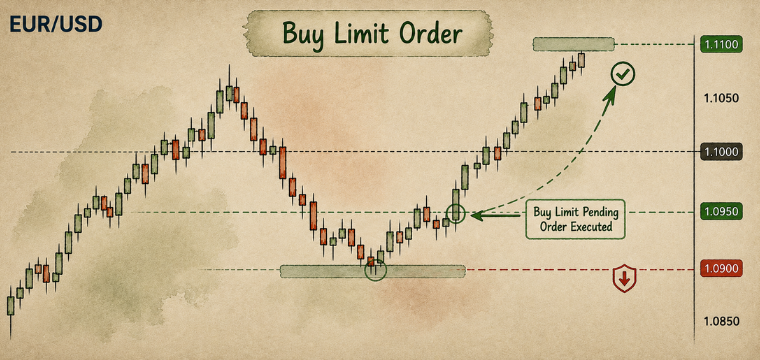
Example: EUR/USD is trading at 1.1000. A trader expects a dip to 1.0950 before the uptrend resumes, so a Buy Limit is placed at 1.0950. If the Ask reaches 1.0950, the order is filled, and a long position opens automatically.
2. Sell Limit Order
This is just the opposite of a buy limit order when the trader expects the price to rise again before continuing the downward rally. You can set the minimum Bid price you are willing to accept, with the order placed above the current market price. If the Bid reaches that level or moves higher, the order can be filled.
Traders typically use this setup when they expect price to climb into resistance before turning lower.
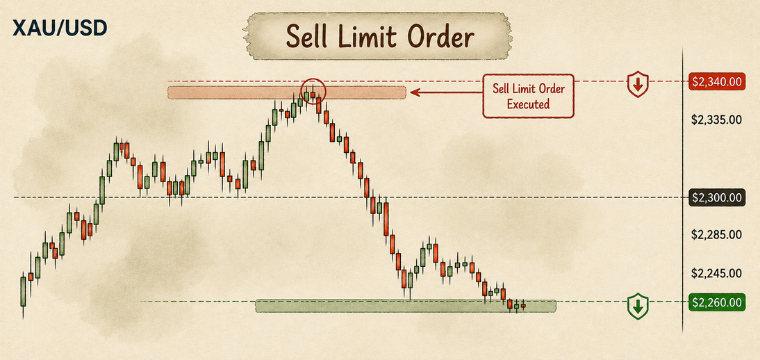
Example: Gold is trading at $2,300. A trader expects it to reach $2,340 before sellers take over, so a Sell Limit is placed at $2,340. Once the Bid reaches $2,340, the order executes, and a short position opens automatically.
3. Buy Stop Order
The order is placed above the current market price and triggers when the Ask reaches the specified level or moves higher.
Unlike a Buy Limit, the trader is not waiting for price to become cheaper. The aim is to get into the market if price breaks through a level and keeps moving up.
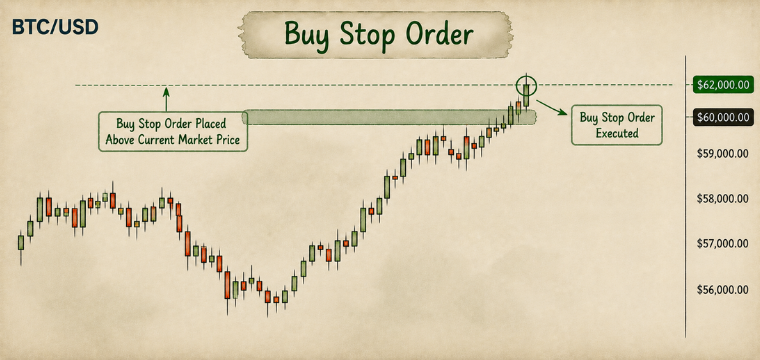
Example: Bitcoin is trading at $60,000. A trader wants to enter only if it breaks above $62,000, using that level as confirmation that the upward move has gained momentum. The trader places a Buy Stop at $62,000. Once the Ask reaches that price, the long position opens automatically.
For breakout trades, a buy stop order is the preferred choice. Instead of anticipating a breakout, the order is placed above a significant breakout level and executes once it's reached.
4. Sell Stop Order
This is one of the most common pending orders discussed in the trading community. A sell stop order is a top priority for long traders to manage risk efficiently. A Sell Stop does the reverse of a buy stop order. The order is placed below the current market price and triggers when the Bid falls to the specified level or below it.
The trader is essentially waiting for the price to break a support level before executing the order. Rather than selling while the market is still above support, the order is there in case the breakdown actually happens.
Example: A stock CFD is trading at $150. A trader expects selling pressure to increase if price falls below $145, so a Sell Stop is placed at $145. If the Bid reaches $145 or lower, the short position opens automatically.
CFDs are complex instruments and come with a high risk of losing money rapidly due to leverage. 56% of retail investor accounts lose money when trading CFDs with this provider. You should consider whether you understand how CFDs work and whether you can afford to take the high risk of losing your money.
5. Buy Stop Limit Order
A Buy Stop Limit combines two orders: a Buy Stop trigger and a Buy Limit order. The stop level first confirms that price has moved high enough to trigger the setup. Instead of buying immediately, the platform then places a Buy Limit at the lower Stop Limit price.
The idea is to wait for the breakout, but avoid chasing price if it runs higher immediately. The trader gets the confirmation they wanted and then waits for a possible pullback to a better entry.
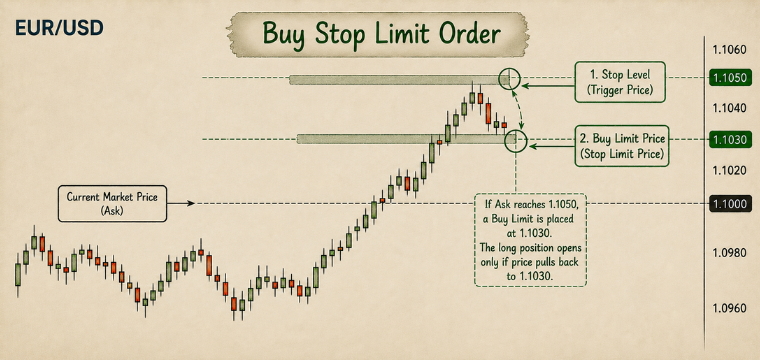
Example: EUR/USD is trading at 1.1000. A trader sets the stop level at 1.1050 and the Stop Limit price at 1.1030. If the Ask reaches 1.1050, a Buy Limit is placed at 1.1030. The long position opens only if price later pulls back to 1.1030. If it keeps climbing, the Buy Limit remains unfilled.
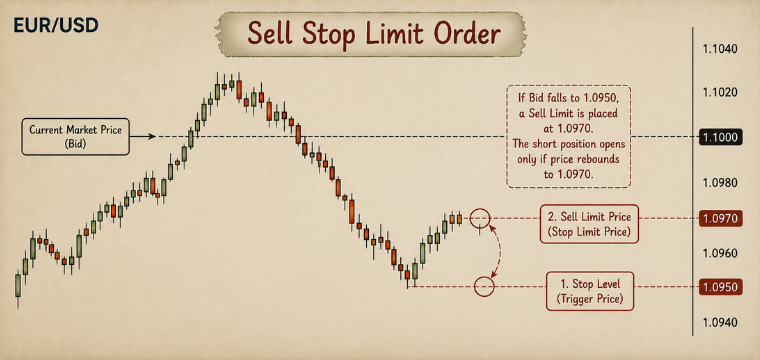
6. Sell Stop Limit Order
A Sell Stop Limit uses the same basic idea in reverse. The trader first sets a stop level below the current market price. Once that level is reached, the platform places a Sell Limit at a higher price.
This setup is useful when a trader wants confirmation of a breakdown but does not want to sell immediately at the lower price. Instead, the order waits for a possible bounce before entering.
Example: EUR/USD is trading at 1.1000. A trader sets the stop level at 1.0950 and the Stop Limit price at 1.0970. If the Bid falls to 1.0950, a Sell Limit is placed at 1.0970. The short position opens only if the price then rebounds to 1.0970. If that bounce never happens, the Sell Limit remains unfilled.
How to place pending orders on platforms
The exact steps for placing a pending order depend on the platform, but the process is broadly the same:
- Select the asset you want to trade and open a new order window.
- Choose “Pending Order” instead of a market order.
- Select the order type: Buy Limit, Sell Limit, Buy Stop, Sell Stop, Buy Stop Limit, or Sell Stop Limit, depending on what the platform supports.
- Enter the trigger price and, where required, the additional Stop Limit price.
- Add a stop loss and take profit if they are part of your trading plan.
- Set an expiry time if you do not want the order to remain active indefinitely.
- Review and confirm the order.
How to manage pending orders and stop loss
Placing the order is only one part of managing the trade. Before it triggers, you also have to decide what should happen if the market moves against you or if the setup is no longer valid.
You can usually attach a stop loss when placing a pending order. The level should reflect where your trading idea would be considered invalid, rather than simply how much money you are willing to lose.
Position size should be calculated before placing the order. Your entry price, stop loss, and position size together determine your potential loss if the trade moves against you.
You should also review your pending orders regularly. If market conditions change or the reason for placing the order disappears, cancel it to avoid an old instruction triggering later. Choosing an expiry time helps with this by automatically removing the orders that are not triggered within your chosen timeframe.
When should you use pending orders
Pending orders are useful when you have a specific entry level in mind but do not want to enter the market immediately.
For example, if you expect an asset to pull back to support before moving higher, you can place a Buy Limit at that level instead of waiting for the price to reach it and entering manually.
You can also use them for breakout strategies. If you want to enter only after price moves above resistance, you can place a Buy Stop above that level. A Sell Stop works in the same way for a downside breakout.
Common situations where pending orders can be useful include:
- Pullback entries: Using a Buy Limit or Sell Limit when you expect price to reach a more favorable level before reversing.
- Breakout trades: Using a Buy Stop or Sell Stop when you want price to break through a key level before entering.
- Limited screen time: Allowing the platform to monitor your chosen entry while you are away from the charts.
- Technical setups: Placing orders around support, resistance, previous highs and lows, or other predefined levels.
- Reducing impulsive decisions: Setting the entry in advance can help you follow your plan instead of reacting to short-term price movements.
Risks and errors of pending orders
Pending orders give you more control over your entry, but they do not guarantee the exact execution you expect. Several risks are worth keeping in mind.
Slippage: In fast-moving or illiquid markets, an order may be filled at a different price from the level you specified. This is more common during major news events or sudden market moves.
Gaps: If the market opens beyond your pending order level, the trade may be executed at a significantly different price. This can happen after weekends or major news.
False breakouts: Buy Stop and Sell Stop orders can be triggered by a brief move through a key level before price reverses. This is common in choppy markets.
Outdated orders: A pending order can remain active for days or weeks. If market conditions have changed, the original setup may no longer make sense. Review open orders and cancel those that are no longer valid.
Spread widening: During periods of high volatility or low liquidity, spreads can widen. Since Buy Stop/Buy Limit orders trigger on Ask + Sell Stop/Sell Limit orders trigger on Bid price, this can cause an order to trigger sooner than expected.
Orders placed too close to the market: Brokers may require a minimum distance (stop level) between the current price and a pending order. If the level is too close, the platform may reject the order.
Another common trading mistake is confusing limit and stop orders. A Buy Limit is placed below the current market price, while a Buy Stop is placed above it. The same applies to Sell Limit and Sell Stop orders, but in the opposite direction.
Remember that a pending order only controls when you enter. It does not limit how much you can lose. Define your stop loss, position size, and maximum risk before placing the order rather than after it triggers.
Bottom Line
Pending orders are among the most useful tools for planning a trade. They let traders set an entry at a specific price, so they don't have to sit in front of a chart waiting for the market to reach it. However, an order type doesn’t fix other trading problems, if the trade is poor, a pending order simply automates the entry.
Real market experience in live trading is the best way to understand and learn these orders correctly. Change’s CFD trading platform offers MetaTrader 5, which allows traders to use these pending orders efficiently. You can use these orders across forex, indices, commodities, and crypto markets, where price can move quickly between key levels.
CFDs are complex instruments and come with a high risk of losing money rapidly due to leverage. 56% of retail investor accounts lose money when trading CFDs with this provider. You should consider whether you understand how CFDs work and whether you can afford to take the high risk of losing your money.
FAQs
1. What is a pending order in trading?
A pending order is an instruction to buy or sell an asset at a specified price once the market reaches that level.
2. What are the six types of pending orders?
MT5 supports six pending order types: Buy Limit, Sell Limit, Buy Stop, Sell Stop, Buy Stop Limit, and Sell Stop Limit.
3. How do pending orders work?
Pending orders remain inactive until the market reaches the specified price or conditions (for Stop Limit orders), at which point the broker executes the order based on its conditions.
4. What is the difference between a pending order and a market order?
A pending order executes when specified price or conditions are met, while a market order executes immediately at the best available price.
5. Can a pending order be canceled?
Yes, a pending order can be canceled before it is triggered and converted into an active order.