Beginner traders open MetaTrader 5, see the order window, and pick "Market Execution" without thinking twice. But not all strategies are executed with a single order type, and this habit sidelines the trading process and forces random decisions.
MT5 offers six pending order types beyond the market order, and aligning strategies with efficient order types is what separates traders who react to the market from those who plan for it.
In this guide, we are discussing every MetaTrader 5 order type in detail, including the two that most beginner guides completely ignore.
Key Takeaways
- MetaTrader 5 supports two major order categories: market orders and pending orders, along with Stop-Loss and Take-Profit orders for risk management.
- Understanding how MT5 order types work is most valuable when you have a platform that lets you apply that knowledge across real markets.
What Are Order Types in MetaTrader 5?
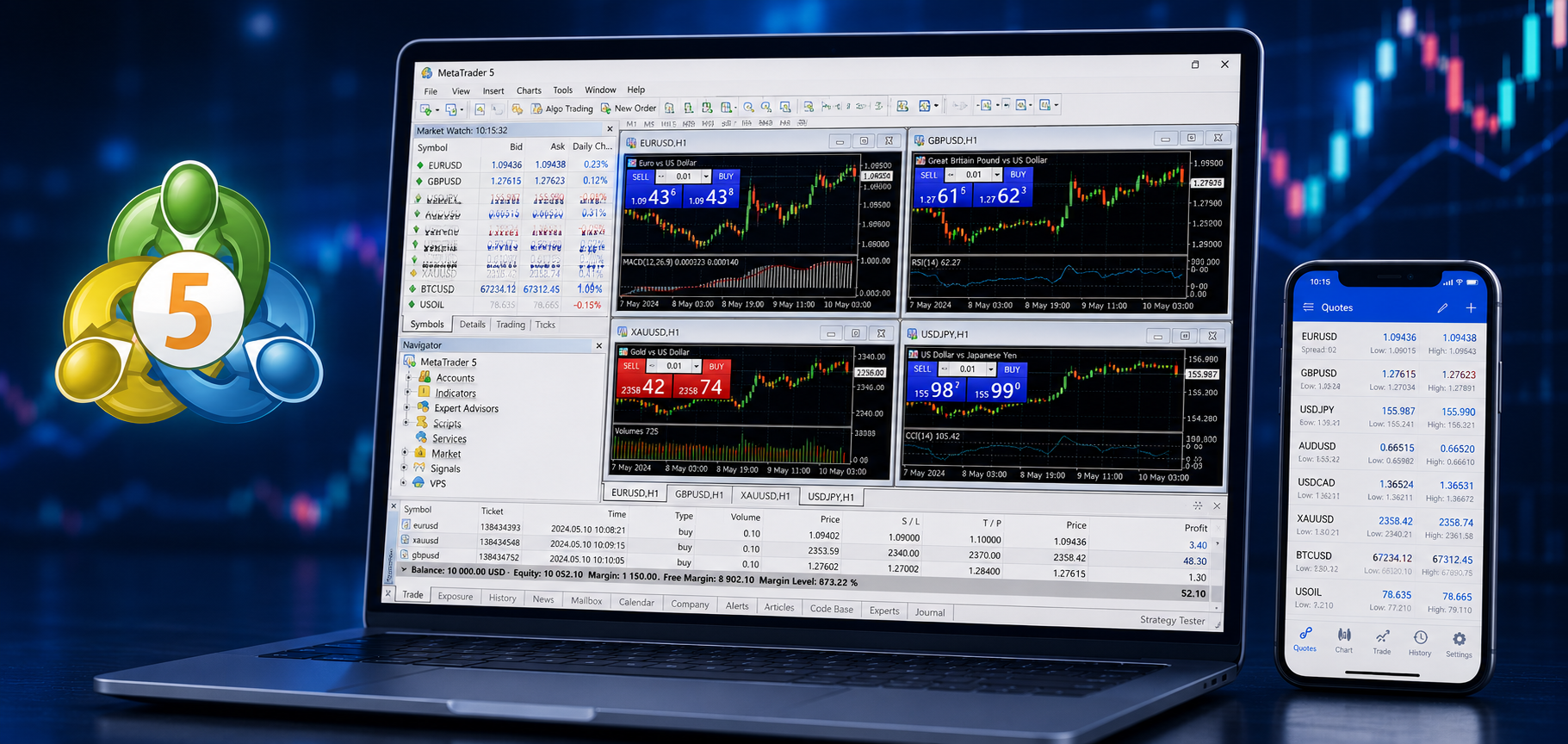
Order types are the commands that specify precisely when and how your trade will be executed. Instead of simply buying or selling at a current live price, traders can attach conditions to a trade: a specific entry price, a direction, or a trigger level.
That is important because markets do not move directly from point A to point B, prices falter before they rally, run up before they give in, and test critical levels before committing to a trend. With the right order type, you can prepare for those scenarios before they happen instead of reacting in real time.
MT5's expanded order set supports everything from quick scalping entries to complex multi-step algorithmic strategies.
How Many Order Types Does MT5 Have?
In the MetaTrader 5 platform, orders are divided into two main types: market and pending. Besides them, there are Stop-Loss and Take-Profit orders:
1. Market Orders in MetaTrader 5
A market order is the simplest execution type on the platform. It simply means that you are buying or selling a financial instrument immediately at the best available price, an instant execution.
Traders who want to enter a position immediately use a market order to react to breaking news, close a trade quickly to protect profits, or enter a trend already in motion.
When to use a market order:
- Entering a confirmed breakout in real time
- Exiting a position urgently when price moves against you
- Trading highly liquid pairs or instruments where spreads are tight
The main risk of a market order is slippage, which can be substantial in high-volatility, low-liquidity instruments. During fast-moving conditions, the price at which your order fills can differ slightly from the price displayed when you clicked.
On major forex pairs, this is usually minimal, but on lower-liquidity instruments or during major news releases, it can be more meaningful, which is why experienced traders often prefer pending orders when they have time to plan.
2. Pending Orders in MT5
Pending orders are one of the most important parts of systematic trading. Traders who have predefined conditions and know exactly where and how they want to enter the market use these order types, then walk away from the screen while MT5 monitors the price on their behalf.
There are six pending order types in MetaTrader 5, each designed for a different market scenario:
Buy Limit
A Buy Limit order is placed below the current ask price. A trader places an order: Buy this asset, but only if the price drops to this level first.
This order type suits traders who expect a brief pullback before a continued move upward.
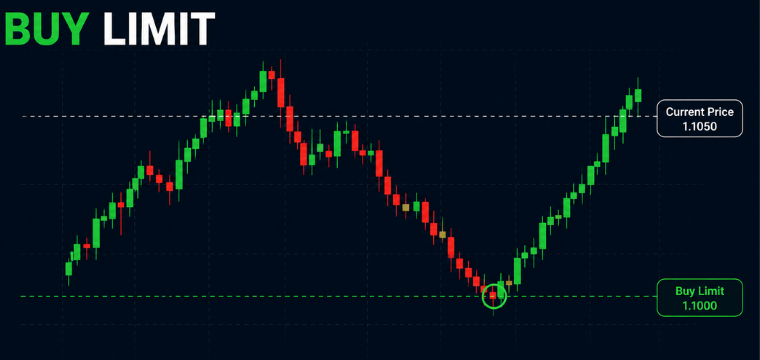
The benefit over a market order is price control. You enter at a planned level rather than chasing price as it moves.
Sell Limit
A Sell Limit is placed above the current bid price and is the opposite direction order type of a buy limit order. The platform executes the sell trade only if price rises to the specified level.
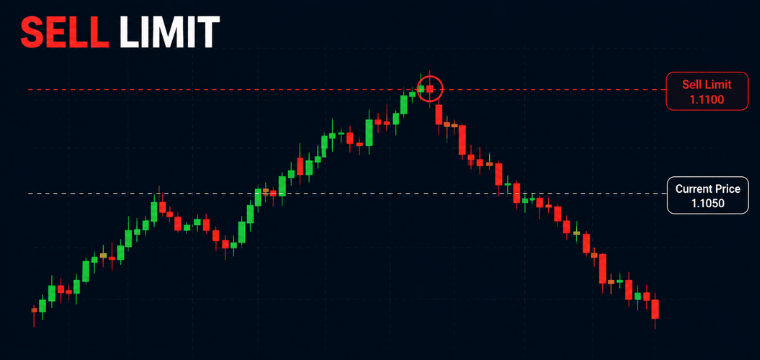
Traders use Sell Limits to target resistance zones where they expect selling pressure to emerge. If an asset approaches a level it has consistently reversed from in the past, a Sell Limit captures that trade automatically without requiring the trader to watch for the exact moment.
Buy Stop
A trade request is placed above the last price. The trade executes only if the market rises and hits that trigger level.
This is the standard breakout entry order. If a forex pair has been consolidating below a key resistance level and a trader expects a breakout higher, a Buy Stop just above that resistance means the trade only triggers if the level actually breaks, not before, when a false break could still occur.
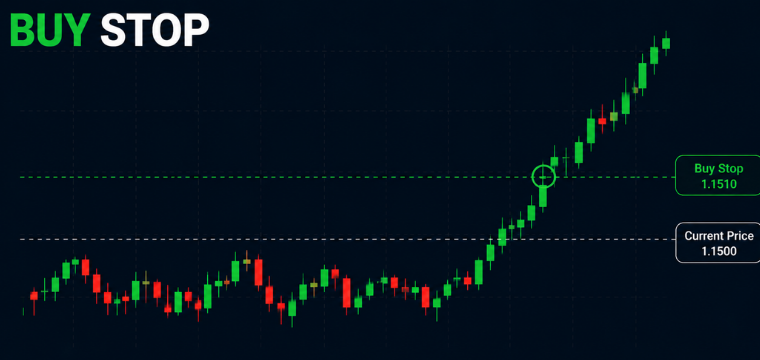
Example: EUR/USD has ranged below 1.1500 for two weeks. A trader places a Buy Stop at 1.1510. If the breakout happens, the position opens automatically. If the range continues, nothing executes and no loss is taken.
Sell Stop
A Sell Stop is placed below the current market price and is the opposite direction order type of a Buy Stop order. It executes when the market falls to the specified level.
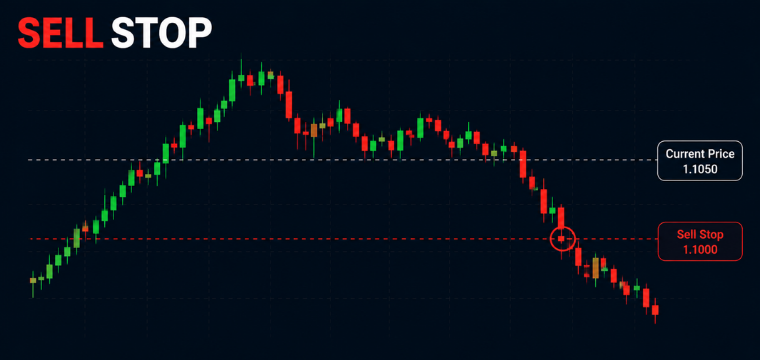
Sell Stops are used in breakdown trades. When a key support level looks at risk of failing, a Sell Stop just below it allows traders to enter the downside move at the moment of confirmation rather than anticipating a break that may not happen.
Buy Stop Limit
The Buy Stop Limit is one of the two order types exclusive to MetaTrader 5 that you will not find on MT4.
This order combines two instructions. First, a trigger price (the Stop). When the market price rises to that level, MT5 does not immediately execute a buy. Instead, it places a Buy Limit at a lower specified price. The trade then only executes if the market pulls back to that limit level.
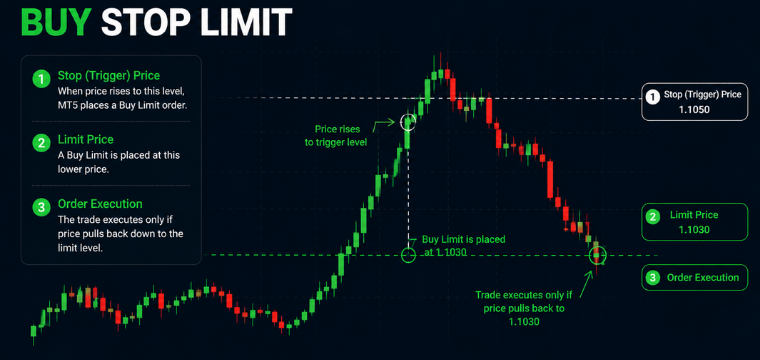
This gives traders precise control over breakout entries. Instead of buying at the moment of a breakout (when momentum and spreads can be elevated), the Buy Stop Limit waits for the initial surge and then tries to fill on a minor pullback. This reduces slippage risk and improves entry pricing in fast markets.
For traders running CFD trading operations on volatile instruments, this order type is particularly useful.
Sell Stop Limit
The Sell Stop Limit mirrors the Buy Stop Limit in the opposite direction. When price falls to the Stop trigger level, MT5 places a Sell Limit at a higher specified price rather than selling at market immediately.
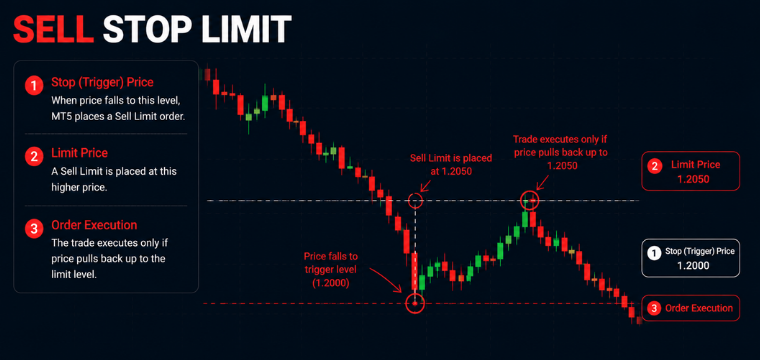
This order type is primarily used by advanced traders and algorithmic systems where getting a better execution price on a breakdown trade matters more than guaranteed immediate entry. If the pullback does not occur and price continues to fall without retracing, the Sell Limit does not fill, and no trade is opened.
3. Stop loss order
A stop loss is an instruction you give to any open trade that automatically closes your position if the market moves against you by a set amount. Instead of watching the screen and hoping a losing trade recovers, the platform exits the trade at your predefined level, capping your loss before it grows beyond what you are willing to risk. A stop-loss order can also be adjusted manually or automatically as a trailing stop, moving with the price to lock in gains as a trade becomes profitable.
A stop-loss order is a tool to manage open positions and is one of the most important order types for any kind of trader in any market situation or asset.
4. Take profit order
A take profit is an instruction that automatically closes your trade once the market reaches your target price, locking in your gains without you needing to be at the screen at that exact moment.
Rather than second-guessing whether to hold or exit when a trade is winning, the platform closes it at the level you decided on when your thinking was clear and unemotional.
Common Mistakes When Using MT5 Order Types
Even experienced traders make avoidable errors with MT5's order system. These are the ones that appear most frequently:
- Confusing Stop and Limit orders: A Buy Stop executes above the current price, a Buy Limit executes below. Getting these the wrong way around is one of the most consistent beginner errors and can result in immediately entering a trade in the wrong direction.
- No expiration on pending orders: Orders without an expiry date remain active indefinitely. An old pending order from a previous setup can trigger days later under completely different market conditions.
- Stop losses placed too close: Stop loss levels set just a few pips from the entry get hit by ordinary market noise before the trade has time to develop. Volatility analysis should inform stop placement.
- Ignoring spreads on limit orders: Spreads widen during news events and at market open. A pending order triggered in that window may fill at a noticeably different price than intended.
- Market orders during high-impact news: Slippage during central bank announcements or major economic releases can be severe on some instruments. Pending orders with defined trigger levels generally offer better control during those windows.
Final Thoughts
Knowing your order types is one of the critical aspects of trading. However, it is only half the equation, the other half is having access to markets where those orders can actually work for you. Whether you are placing your first Buy Stop or automating entries through an Expert Advisor, the right MT5 broker makes the process cleaner.
If this guide helped you understand how MT5 orders fit into a real trading strategy, the next logical step is seeing what markets you can apply them to. Explore the full range of instruments available on Change and see how the order types covered here translate into live market access, from CFDs on major forex pairs to global indices, with transparent pricing and no hidden fees.
CFDs are complex instruments and come with a high risk of losing money rapidly due to leverage. 60% of retail investor accounts lose money when trading CFDs with this provider. You should consider whether you understand how CFDs work and whether you can afford to take the high risk of losing your money.
Frequently Asked Questions (FAQs)
What are the order types in MetaTrader 5?
MetaTrader 5 supports two major order types: market orders and pending orders, plus stop-loss and take-profit orders.
Which MetaTrader 5 order type is best for beginners?
Market orders and basic Buy Limit or Sell Limit orders are the easiest MT5 order types for beginners to understand and use.
What is the difference between a Stop order and a Stop Limit order in MT5?
A Stop order executes at market once triggered, while a Stop Limit order places a Limit order after the trigger price is reached.
Can I place pending orders on MetaTrader 5?
Yes, MetaTrader 5 lets traders place pending orders that automatically open trades when the market reaches a specified price.
Why does MetaTrader 5 offer more order execution options than MetaTrader 4?
MT5 includes additional Stop Limit orders to give traders greater control over execution, advanced strategies, and automated trading.